

Microsoft Ending Support for OneDrive on Windows 7, 8 and 8.1
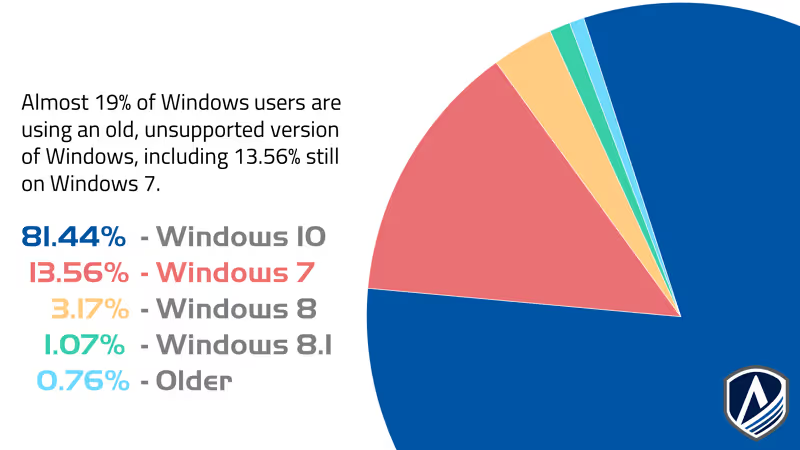
Are you still running an old version of Windows? Statistics show that 18.56% of Windows users are still using an older, unsupported version of Windows. This includes 13.56% of users who are still on Windows 7, which has been unsupported since January 2020. Computers with an unsupported operating system don't receive software updates, security updates, patches, etc..., leaving them vulnerable to malware and attacks. Security risks aside, there are plenty of reasons why users should upgrade to Windows 10 or Windows 11, such as:
- Faster startup
- Better desktop support
- Syncing between devices
- Office 365 and Teams integration
- Faster and safer web browsing
- More efficient updates
Last Friday, Microsoft gave us another reason to upgrade your Windows OS. After March 1, 2022, Microsoft will end support for the OneDrive desktop application on Windows 7, 8 and 8.1. This means that files on your desktop will no longer sync to OneDrive and you will need to manually upload them on OneDrive for web. Microsoft recommends upgrading your operating system to Windows 10 or Windows 11 to avoid disruption.